


I built a stock selection Skill myself, screening 80 Hong Kong and US stocks with one click, and the report is generated directly.
Selecting stocks has always been a headache.
The criteria are clear—large enough market cap, reasonable PE, upward trend, increased volume—but you have to go through them one by one. After checking over a dozen, half an hour is already gone, and by the time you get to the later ones, the data for the earlier ones has changed.
Last week, I used Longbridge Skill to build a screener. After getting it to work, I found it quite practical, so I'm sharing it.
How to use it
Just tell the AI the screening criteria, for example:
"Screen for Hong Kong and US stocks for me, market cap above 50 billion, PE below 30, MACD bullish, price above MA200, volume increase over 120%."
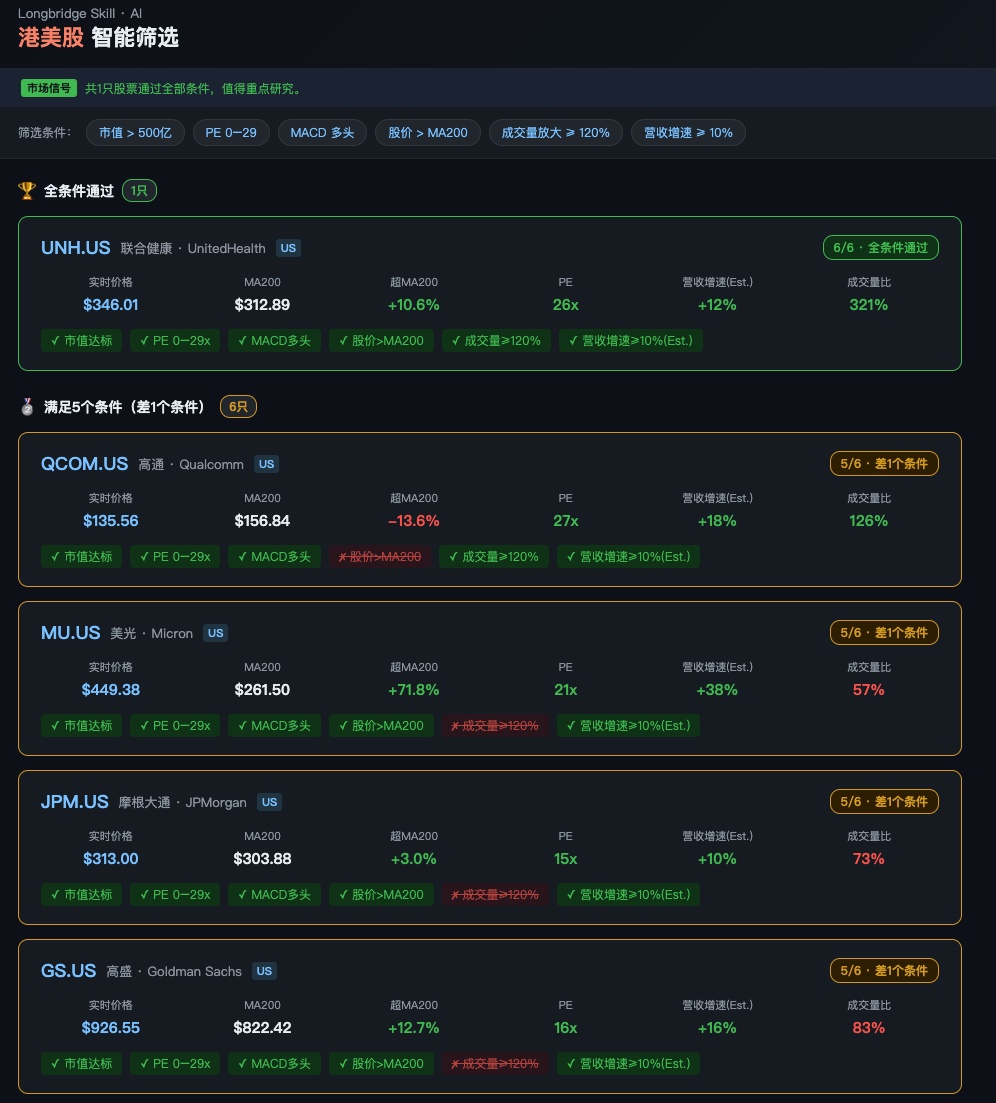
The Skill will automatically parse the conditions, call the Longbridge CLI to pull real-time quotes, nearly 300 days of K-line data, PE and market cap data, then calculate MA200, MACD, and volume ratio, filter them one by one, and finally generate a dark-themed HTML report that automatically opens in the browser.
The candidate pool I preset includes 80 Hong Kong and US stocks, covering US stocks in tech/finance/consumer/healthcare/energy, plus mainstream Hong Kong stocks in internet/finance/consumer sectors. You can also say "only Hong Kong stocks," "only US stocks," or "screen from my watchlist," and the Skill will automatically switch the stock pool.
What the report looks like
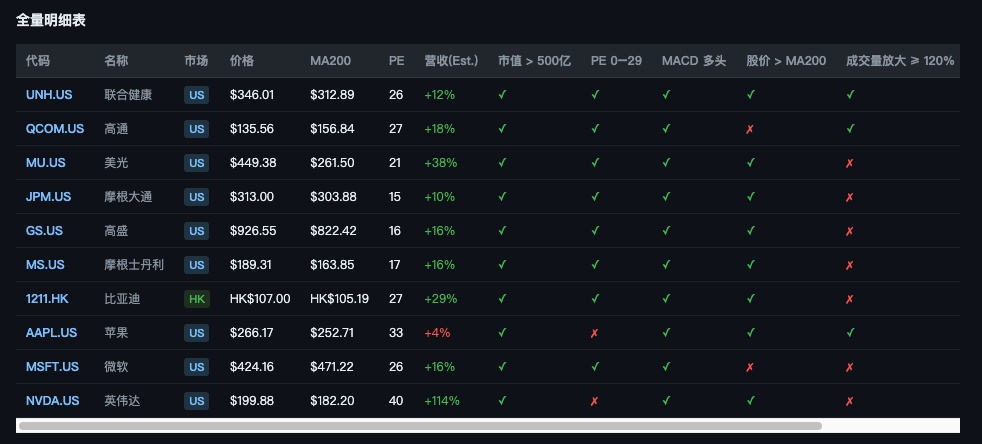
Each stock gets a card showing real-time price, MA200, percentage above MA200, PE, volume ratio, and revenue growth. Conditions are checked off one by one. Those passing all conditions with a green border are ranked at the top, followed by those missing one or two conditions with an orange border. Below that, there's a complete detailed comparison table.
Additionally, the script performs a self-check on each stock—whether the price is abnormal, MA200 calculation is consistent, volume ratio is reasonable. Cards with issues are marked with a red warning, so you don't have to worry about getting a result that looks good but has problematic data.
One thing to note
The revenue growth line is a manually embedded estimate from the latest financial reports of each company, not a real-time API, so it's marked with ⚠️ Est. in the report. The Longbridge CLI currently doesn't have an API to directly pull revenue growth. If this metric is very important to you, it's recommended to double-check against the financial reports.
If anyone wants to try it, first install the Longbridge Skill within the AI assistant, then just say "screen stocks for me," and the Skill will guide you through entering the conditions.
You can also throw my screenshots to the AI assistant and have it generate something similar.
$Tencent.HK $TSMC.US $NVIDIA.US $Nasdaq ETF.US
The copyright of this article belongs to the original author/organization.
The views expressed herein are solely those of the author and do not reflect the stance of the platform. The content is intended for investment reference purposes only and shall not be considered as investment advice. Please contact us if you have any questions or suggestions regarding the content services provided by the platform.
